
V7N1: Designing a proactive multi-touch display to support professional networking and planning at an interdisciplinary conference
By Paul Gestwicki, Carrie Arnold, Joshua Gevirtz | March 4, 2013
Introduction
We present the design of Confluence, a system that enables conference attendees to explore the conceptual space of a multidisciplinary conference, to make deliberate decisions about the relative values of sessions with respect to personal interests, and to promote impromptu mutual revelation in a fluid social context. It is a novel proactive interface whose main components are a multi-touch tabletop interface, radio frequency identification, and custom information visualization software.
The system was designed specifically for the 2009 International Digital Media & Arts Association Conference, which is notable for the breadth of interest of its attendees, including art, humanities, technology, social sciences, usability, education, and business. The mission of the International Digital Media & Arts Association (iDMAa) is to promote the development, application, and understanding of digital media and arts. (1) The organization represents educators, practitioners, scholars, and organizations with interest in digital media and arts. The organization’s seventh conference was held in 2009, and it served as a test for Confluence.
Complications of Multidisciplinary Conferences
Conferences serve several important purposes for both academics and practitioners. Conference organizers promote the theme of a conference by gathering speakers, papers, tutorials, panels, and so on. Thus, the organizers seek to advance understanding and the state of the art within their areas of interest. Individual attendees have the opportunity to disseminate their work, learn new skills, and develop social and professional networks. McCarthy et al. describe this as mutual revelation, “allowing attendees to learn more about others and their work, as well as being open to opportunities to tell others about themselves and their own work.” (2) Effective mutual revelation depends upon attendees’ shared interests and similar expertise. An attendee who knows little about the conference domain will have difficulty integrating information shared by other attendees. Normally, this problem is avoided implicitly since, generally, only individuals who are interested in the conference domain would attend a disciplinary conference. However, multidisciplinary and interdisciplinary conferences pose a particular problem: the attendees, by definition, come from a wide variety of background and represent a broad range of expertise. That is, it is no longer the outliers who are potentially perplexed by conference activities but the majority.
Proactive Interfaces
A proactive interface is one that shows content based on a combination of program logic and proximity of individuals. This is in contrast to conventional interfaces, which are reactive: they respond to discrete user interactions such as mouse, keyboard, or voice commands. In this project, we use radio-frequency identification (RFID) to detect the approach and departure of conference attendees. The interface changes proactively based on who is nearby rather than strictly reactively.
We are not the first to see the potential for proactive interfaces to enhance the conference experience. Three prominent examples are AutoSpeakerID, Ticket2Talk, and the SpotMe Conference Navigator. AutoSpeakerID displays the information of speakers and questioners during sessions, providing people with a quick visual synopsis of who is asking a question, their interests, and their affiliation. (3) Ticket2Talk serves as a conversation piece during breaks: it shows pictures of people near the display, along with a profile and interests. (4) Both applications encourage social networking, though in different ways. Ticket2Talk is a direct integration with presentations, while AutoSpeakerID provides a more ambient experience. These two have been positively evaluated for their installation contexts, although the developers admit concerns about distraction and intrusiveness. (5) The SpotMe Conference Navigator is notable for its applicability to conferences: it runs on a PDA and notifies the user when another attendee is nearby with a similar profile. (6)
Tagging Interests
Confluence helps attendees decide which sessions to attend by highlighting those that may be of interest, and by this, promotes enhanced mutual revelation. The team was inspired by the use of tags on Web-based social media as a means to this end. A finite set of tags was chosen rather than user-specified tags, since the latter introduces problems that are beyond the scope of this work. (7) The set was developed by analyzing past conference schedules and consulting with members of the community. These interest tags were incorporated into both the conference registration site and the paper submission site. Thus, every paper is tagged with interests that are represented in the work, and every attendee has the opportunity during registration to identify his or her interests. The tags are: Architecture; Computer Music, Cyberculture/Internet Culture; Digital Fabrication; Educator/Pedagogy; Entrepreneurship; Ethics; Film; Film/Video Production; Futurology; Game Design; Graphic Design; Human/computer interaction; Humanities; Interface design; Journalism; Legal Issues; Machinima; Marketing; Music engineering; Open source; Painting & Drawing; Philosophy; Sculpture; Social Networking; Software development; Theatre & Dance; Ubiquitous computing; Virtual Worlds; Visualization; and Web design/development.
Multi-touch Interaction on the Microsoft Surface
While the RFID provides a capacity for proactive interfaces, the Microsoft Surface provides multi-touch interaction in a tabletop computing environment. The tabletop orientation facilitates multiple users, and the recognition of multiple concurrent touches promotes collaborative use.
Primary among the design principles for multi-touch tabletop computing is direct manipulation: users interact directly with the interface content rather than through indirect widgets such as menus and text commands. (8) Designing direct manipulation multi-touch interfaces is a difficult design challenge as this technology is still in its infancy. All users in the intended audience are intimately familiar with the WIMP (Windows, Icons, Menus, and Pointers) paradigm, where learned affordances can be exploited to expose novel functionality. However, in multi-touch collaborative environments, practically all users (aside from the occasional researcher who focuses on this technology) are novices or advanced beginners. (9) Therefore, in order to empower novice users while maintaining continuous collaboration in a fluid social environment, the interaction model must leverage clear affordances while supporting scaffolding toward more advanced use cases. (10)
Design
The Surface-based interface is divided into three sections: the Navigation Bar, the Workspace, and the Gutter. Figure 1 is a screenshot of a pre-release build of Confluence, showing a sample interaction with the system. The Navigation Bar is on the left, the Workspace is the central area, and the Gutter surrounds the workspace on the top, right, and bottom sides.
Navigation Bar
The Navigation Bar displays the conference schedule. The 2009 iDMAa conference is a three-day event, and the three buttons at the top of the navigation bar represent the three days. Pressing one of these buttons selects that day, and the rest of the Navigation Bar is populated with the events from that day. For example, in Figure 3, the Thursday button is highlighted and so Thursday’s events are shown below it. Animated transitions are used to improve the aesthetics and the utility of the system. Specifically, animated transitions leverage cultural conventions to assist in developing the user’s mental model of time: the days’ schedules fly in from the left or right depending on whether the newly selected day is in the past or the future, in accordance with this culture’s left-to-right reading order. (11)
At any time, the Navigation Bar clearly shows, through color highlighting, which day and which conference event are selected. The name of the currently selected event in the Navigation Bar is also embedded into the Workspace background, so users who are not aligned for convenient reading of the Navigation Bar can also ascertain the current context by inspecting the Work space background. Thus, the Navigation Bar and the associated Workspace background labels provide the context for the rest of the interactions, stable locations from which new users may acclimate themselves to the more complex Workspace and Gutter interactions.
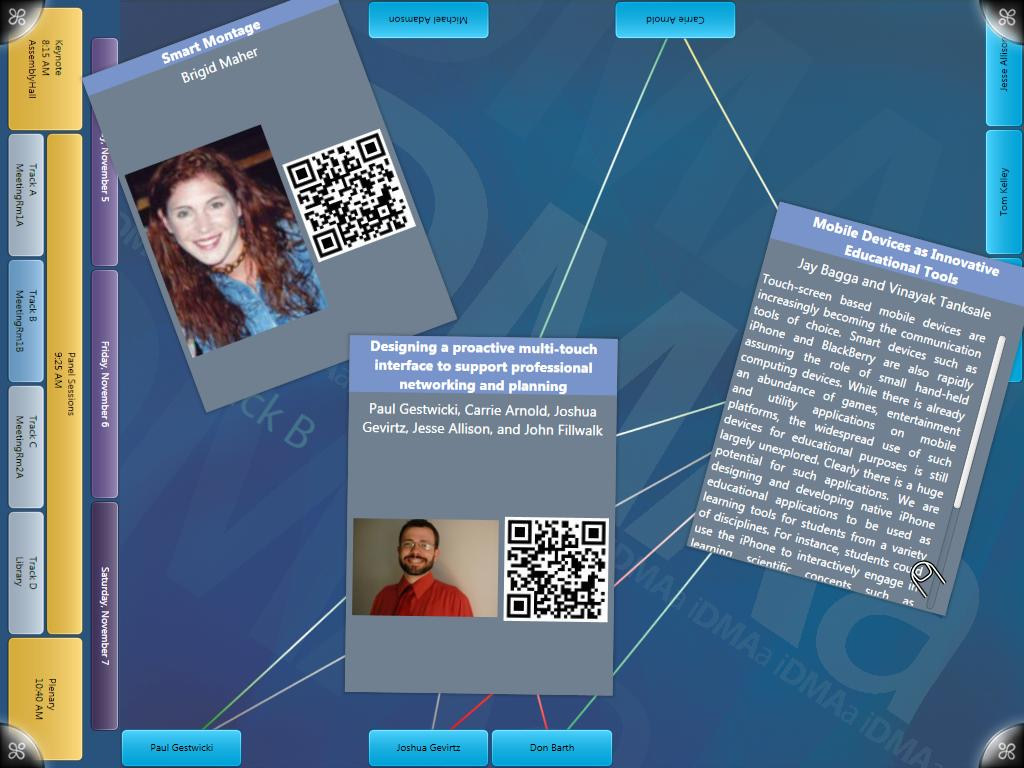
Figure 1: Confluence screen shot
Workspace and Cards
The work space is the largest region of the interface, and it is where we expect the majority of attention to be focused. The work space is a “scatter view,” an area in which items are placed that can be moved, scaled, and arranged using multi-touch interactions. Scatter views have featured prominently in the Microsoft Surface promotional materials and sample applications, and the interaction model is reminiscent of the popular multi-touch iPhone and iPod Touch devices from Apple: one finger will move an item, two fingers will scale an item, and interacting with any item will bring it to the “top.” We have also integrated a common idiom wherein the cards behave as if they have two sides. A quick tap of a card will cause it to flip over, revealing complementary information on the other side.
The Keynote, Plenary, and Presentation Cards are similar in design and intent: one side shows the title, speaker, and abstract, and the reverse side shows the title, speaker, and a photograph of the speaker. Also, this side contains a QR-code (12) that links to the speaker’s profile page on the interactive conference Web site. The Session Cards are different: these are designed to assist users in seeing the contents of concurrent sessions at a glance. The Session Cards list the name of the session along with the names and authors of each of the presentations within that session. The reverse side shows a montage of speaker photographs along with the QR-code that encodes the event URL.
As in the Navigation Bar, animated transitions are applied for aesthetic and utilitarian purposes. When a new conference event is selected, those cards in the workspace are animated away from the navigation bar, which is also the dominant reading direction of the workspace background image. The new selections animate to random positions in the workspace from the navigation bar side of the interface, visually indicating that it was the navigation bar that caused the transition.
Gutter, Attendee Icons, and Interest Lines
The Gutter runs along the side of the workspace, and it is in this area that Attendee Icons are shown. These icons represent individuals who are detected to be nearby via the RFID system, and they show the attendee’s name as well as photograph, when available. Note that this means that the Gutter should never be empty when the interface is approached by a properly tagged attendee: rather, the attendee will immediately see a recognizable representation of him or herself as part of the interface.
Strongly related to the Attendee icons in the Gutter are the Interest Lines. These lines connect Attendee Icons to those Cards in the Workspace that have corresponding interests. As mentioned above, these interest tags are selected by authors during paper submission and by attendees during registration. The intensity of the line indicates the degree of similarity. This is designed not only to help an individual attendee to easily see the conference events of potential interest, but also as a means for enhancing mutual revelation among concurrent Confluence users. The presence of the interest lines is intended to spark conversation among concurrent users, since each will be able to see how all are connected to the currently selected conference event.
Integration with the iDMAa Web Site
Confluence was developed in parallel with an experimental conference Website that integrates social media with the iDMAa conference, as has been explored in related projects such as Pathable. (13) The site was developed by the Institute for Intermedia Arts and Animation, and it features a unique page for each conference event. (14) These pages link to professional and contact information about the speakers, including links to social networking services such as Facebook and Twitter.
As mentioned above, each card in the Workspace contains a QR-code that encodes a URL, as shown in Figure 2. Attendees with appropriate mobile devices, such as the Apple iPhone or Android-enabled phones, will be able to scan the QR code and be taken directly to the corresponding page on the interactive iDMAa conference site.
Presence Detection through RFID
RFID technology is employed in our project in fashion similar to that of Ticket2Talk and Neighborhood Window. (150 We used an ALR-9650 RFID reader and associated tags by Alien Technology. The antenna is placed above the Microsoft Surface unit on which Confluence software is running. Passive RFID tags are put on each attendee’s name tag. The RFID reader was connected, through a standard Ethernet connection, to the university’s network. Upon initialization, Confluence listens for broadcasts sent by the reader. Once a broadcast is received, the software establishes a connection with the RFID reader and creates a thread that periodically polls it for tag presence information. When this thread detects that an attendee has left or arrived, the information is propagated to the necessary portions of the program.
The presence detection subsystem is based on the ProD framework. (16) The approach and departure of attendees is detected by the RFID reader. Since there is a finite amount of space for Attendee Icons, a queuing system ensures that attendees are processed in the order they arrive.
Data Representation
Confluence loads conference information from a set of configuration files. The two most important are encoded in ConferenceML and PeopleML, XML-based file formats that were designed specifically for this project. ConferenceML is used to represent all of the conference data, including the schedule of events, the interests corresponding to those events, and the speakers at each event. PeopleML represents the conference attendees, including their names, affiliations, and interests.
These two types of information are represented separately due to the volatility of attendee lists. Conference events are generally fixed in advance of the conference, but the list of attendees almost always changes due to on-site registrations and unforeseen impediments to attendance. Representing attendees separately from the conference allows us to easily upload new attendee information to the installation.
The Navigation Bar and all Workspace cards are automatically generated from ConferenceML. This facilitated the rapid prototyping of design ideas, since the initial design began well in advance of the iDMAa 2009 call for papers and therefore well before schedule finalization. Certainly, a graphic artist could likely create a visual representation of a specific schedule that is more visually appealing than a generic, computationally generated one. However, given the time and human resources constraints of this project, the benefits of automatic generation and the rapid prototyping it facilitated were determined to outweigh the aesthetic costs.
Discussion
Confluence is a hybrid of proactive and reactive interaction, the former through RFID and the latter through the Microsoft Surface. The team followed an iterative design process for both aspects of the system. For the multi-touch interface, physical prototypes were first used to simulate on-screen interactions. This led to the development of electronic prototypes for both the proactive and reactive subsystems, and these prototypes were used to generate feedback into the iterative design process. For example, the RFID system was simulated in Surface control so that the multi-touch behavior could be tested as if the presence detection system were completely operational. Problems with the reactive system could be fixed while the proactive system was still being developed, and vice versa. We found that a direct manipulation, multi-touch interaction paradigm lends itself naturally to physical prototyping. Physical prototyping not only helped us simulate possible interactions, but it allowed us to see how quickly your objects would clutter up the workspace.
Early Designs
The design and development of this project began in the summer of 2009 following discussions with the Institute for Digital Intermedia Arts at Ball State University and representatives of the International Digital Media & Arts Association. The team spent most of the summer acclimating themselves with the technology and the philosophy of hybrid proactive/reactive interface development. This led to the design of a system that encourages social networking through an interactive “interest graph,” similar in some ways to Neighborhood Window. (17) This system used the GraphViz library for a force-directed, spring model for automatic graph drawing. (18) However, there were two major complications with this design. First, the automatic layout of items conflicted with the direct manipulation that is both natural on a tabletop computing device and recommended by the Surface design guidelines. (19) Second, we found that the working area of the Microsoft Surface was too limited to display this information adequately, according to our desired visual designs. In retrospect, these conclusions would have arisen more quickly had the team incorporated physical prototyping more rigorously; while the specific software developed in this first iteration was abandoned, the lessons allowed us to make much faster progress on the design of what became Confluence.
Complications of Website Integration
As mentioned above, Confluence integrates with an interactive conference Web site through embedded QR codes. The site allows attendees to share professional contact information and also to participate in Web-based discussion about the conference and associated projects. Early designs of Confluence included similar functionality, such as the ability to drag representations of individuals together to share contact information. However, this design introduced two significant problems. First and more importantly, it is not possible within our design to authenticate that a user is a specific conference attendee, and so it would be possible for third parties to create social media connections between two other people. The presence detection system would have ensured that at least the attendees’ badges would be nearby to initiate such a connection, but this design clearly introduces identification uncertainty. The second problem is that the semantics of combining individuals was determined not to be immediately clear. Hence, the interaction would require a notification and verification.
Traditional dialog box confirmations would be out of place in a collaborative multi-touch interaction space, and so the visual design would need to be augmented to include specific references to social network interactions. Such a design was outside of the scope of the project, although it could be considered for future work.
Conclusions and Future Work
Confluence integrates proactive and reactive interfaces by combining RFID presence processing with a multi-touch table-top interface. This design is intended to improve the mutual revelation and professional networking that takes place at conferences, which can be challenging at multidisciplinary conferences such as iDMAa. Following the best practices of proactive interfaces facilitated the design and development of this system. (20) The ProD framework also provided a useful reference model for data flow in a presence detection and processing system. (21)
Several features have been explored and prototyped during the iterative design process, and many of these have not been incorporated into the iDMAa experience. Particular features that are expected to further enhance the goals of the system include integration with social networking sites such as Facebook and LinkedIn as well as real-time editing of interests and on-line profiles, akin to the approach taken by Pathable. (22) Authentication and security are two of the primary challenges of including these into a system such as ours. We have also explored the potential for integration of machine learning and data mining algorithms. These could be used, for example, to incorporate explicit event suggestions to users based on their interests, an enhancement of the current ambient recommendation system that shows connectivity between Attendee Icons and Event Cards.
Acknowledgements
This work was supported by the Institute for Digital Intermedia Art, Emerging Media Initiative, and Department of Computer Science at Ball State University as well as the International Digital Media & Arts Association. We are especially grateful for the assistance and support of John Fillwalk, Jesse Allison, Ina-Marie Henning, Jessica Gestwicki, Erin Moore, and Dave Ferguson.
Footnotes:
- International Digital Media and Arts Association. “Digital Media and Arts Association Constitution.” International Digital Media and Arts Association. http://idmaa.org/images/stories/idmaa_constitution.pdf (accessed October 19, 2009).
- Joseph F. McCarthy et al., “Augmenting the social space of an academic conference,” Proceedings of the 2004 ACM Conference on Computer Supported Cooperative Work (2004): 31.
- David W. McDonald et al., “Proactive displays: Supporting awareness in fluid social environments,” ACM Transactions on Computer-Human Interaction 14, no. 4 (2008): 6-8.
- McDonald et al., 8-10.
- McDonald et al., 18-20.
- Ben Congleton et al., “The ProD framework for proactive displays,” Proceedings of the 21st Annual ACM symposium on User interface software and technology (2008): 221-230.
- Cameron Marlow et al., “HT06, tagging paper, taxonomy, Flickr, academic article, to read.” Proceedings of the seventeenth conference on Hypertext and hypermedia (2006): 38.
- Ben Shneiderman, “Direct manipulation: a step beyond programming languages,” IEEE Computer 16, no. 8 (1986): 57-69.
- Hubert Dreyfus and Stuart Dreyfus, Mind over Machine: The Power of Human Intuition and Expertise in the Era of the Computer (New York: Free Press, 1988): 22-23.
- Donald A. Norman, “Affordances, conventions, and design,” Interactions 6, no. 3(1999): 41.
- Norman, 41.
- Quick-Response Code, a two-dimensional barcode, as shown in the screenshots. QR-Codes can be read by camera-equipped smart phones such as the iPhone and most Android phones.
- Shelly D. Farnham et al., “Leveraging social software for social networking and community development at events,” Proceedings of the fourth international conference on Communities and technologies (2009): 237–239.
- Institute for Digital Intermedia Arts. “Arts + Technology.” Institute for Digital Intermedia Arts. http://www.idiarts.org (accessed October 25, 2009).
- McDonald et al., 8-13.
- Congleton et al., 223-226.
- McDonald et al., 10–13.
- Emden R. Gansner and Stephen C. North, “An open graph visualization system and its applications to software engineering,” Software – Practice and Experience 30, no. 11 (2000): 1207.
- Microsoft Corporation. “ScatterView Design Guidelines.” Microsoft Surface Community. http://community.surface.com/blogs/develop_going_deeper/archive/2009/08/13/scatterview- design-guidelines.aspx (accessed October 19, 2009).
- McDonald et al., 27–28.
- Congleton et al., 223–226.
- Farnham et al., 237–239.
Works Cited:
Congleton, Ben, Mark S. Ackerman, and Mark W. Newman. “The ProD framework for proactive displays.” Proceedings of the 21st annual ACM symposium on User interface software and technology (2008): 221–230.
Dreyfus, Hubert, and Stuart Dreyfus. Mind over machine: The power of human intuition and expertise in the era of the computer. New York: Free Press, 1988.
Farnham, Shelly D.,Peter T. Brown, and Jordan L.K. Schwartz. “Leveraging social software for social networking and community development at events.” Proceedings of the fourth international conference on Communities and technologies (2009): 235–244.
Gansner, Emden R., and Stephen C. North. “An open graph visualization system and its applications to software engineering.” Software – Practice and Experience 30, No. 11: (2000) 1203–1233.
Institute for Digital Intermedia Arts. “Arts + Technology.” Institute for Digital Intermedia Arts. http://www.idiarts.org (accessed October 25, 2009).
International Digital Media and Arts Association. “Digital Media and Arts Association Constitition.” International Digital Media and Arts Association. http://idmaa.org/images/stories/idmaa_constitution.pdf (accessed October 28, 2009).
Marlow, Cameron, Mor Naaman, Danah Boyd, and Marc Davis. “HT06, tagging paper, taxonomy, Flickr, academic article, to read.” Proceedings of the seventeenth conference on Hypertext and hypermedia (2006): 31–40.
McCarthy, Joseph F., David W. McDonald, Suzanne Soroczak, David H. Nguyen, and Al M. Rashid. “Augmenting the social space of an academic conference.” CSCW ’04: Proceedings of the 2004 ACM conference on Computer supported cooperative work (2004): 39–48.
McDonald, David W., Joseph F. McCarthy, Suzanne Soroczak, David H. Nguyen, and Al M. Rashid. “Proactive displays: Supporting awareness in fluid social environments.” ACM Transactions on Computer-Human Interaction 14, no. 4 (2008): 1–31.
Microsoft Corporation. “ScatterView Design Guidelines.” Microsoft Surface Community. http://community.surface.com/ blogs/ develop_going_deeper/archive/2009/08/13/scatterview-design-guidelines.aspx (accessed October 19, 2009).
Norman, Donald A. “Affordance, conventions, and design.” interactions 6, no. 3 (1999): 38–43.
Shneiderman, Ben. “Direct manipulation: a step beyond programming languages.” IEEE Computer 16, no. 8 (1983): 57–69.