
V6N2: Performing the Interface
By Jeff Nyhoff | March 4, 2013
Reflecting upon the rise to dominance of the commercial graphical user interface over the course of the latter half of the 1980s following the introductions of the Apple Macintosh and Microsoft Windows operating systems in 1984 and 1985, Brenda Laurel argued in her 1991 book, Computers as Theatre, that this new interface paradigm should be celebrated, theorized, and designed in terms of its creation of a distinctively theatrical experience for the user. Laurel warned that the “causality” of this ancient and primal cultural form of theatricality is so forceful that, once GUI designers began making use of it, their resultant interfaces now “try to be and do” theater, “whether you want it to or not.” (1) For this reason, Laurel turns to Aristotle’s treatise on Greek tragedy that has dominated Western theater theory and practice for well over two millennia, the Poetics, repurposing Aristotelian theatrical principles and applying them to the GUI experience, both descriptively and prescriptively: “Confusion over the nature of human-computer activity can be alleviated by thinking about it in terms of theater, where the special relationship between representation and reality is already comfortably established, not only in theoretical terms but also in the way that people design and experience theatrical works.” (2)
Laurel laments that so many GUI designers have focused upon the representation of onscreen objects. In contrast, an Aristotelian theatrical approach to GUI design, says Laurel, demands a focus on the careful design of representations of action. In the Poetics, even the notion of character is conceived entirely in terms of the individual actions that an individual chooses to perform within the given circumstances of the play’s overall action.
Believable Illusions
Laurel repeatedly invokes Aristotle’s definition of theater as the “representation of action” in her text and carefully examines this notion of dramatic “action,” but she performs far less analysis of the other key term in this definition: “representation.” What soon becomes apparent is that the GUI theatricality Laurel celebrates is heavily influenced by the aesthetics of theatrical “realism,” where effective representation is equated primarily with visual believability. Laurel seems to forget that “realistic” theatrical representations are not natural or universal but are conventionalized and culturally specific and that, likewise, the commercial GUI paradigm visualizes user actions in terms of well-established conventions for representing onscreen action.
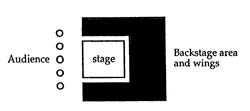 Laurel’s conception of GUI theatricality is also, like realist theater, predicated upon tight constraint of what the audience sees and knows. Her illustrations of realist “proscenium” theater structures indicate a notion of theatrical space that has a clearly and firmly delineated “backstage” area.There should be nothing visible that calls the audience’s attention to the “technical ‘magic’ that supports the performance,” says Laurel, because “who, what, and where” this technical magic has been created and is operating should “not matter to the audience.” (3) In time, audiences will learn to expect – and to accept – such invisibility, finding that the less they see and know about such technical operations backstage, the more readily they are able to commit to belief in the representations of action onstage. Laurel cites Coleridge’s “willing suspension of disbelief,” whereby audiences learn from prior theatrical experiences that they are expected to commit to belief in what might initially seem to be unrealistic representations in exchange for a pleasurable theatrical experience. Thus, theatrical immersion depends upon not only visual but also cognitive constraint of the audience, who should use neither seeing nor thinking about the backstage technical operations. When a theatrical representation of action is “working,” Laurel says, audience members should become so thoroughly “engaged by and involved in the play” that they are “simply not aware” of anything other than the visible “action on the stage.” (4)
Such theatrical immersion turns largely upon emotional mechanisms, particularly through the cultivation of such strong identification with the actions and circumstances of a character that one’s reflex emotional response to them is as if they were one’s own. This is key to Laurel’s remarkable claim that the GUI user occupies the theatrical position of not only audience but also actor. She seems to have in mind popular notions of “method acting” when she insists that, “for the actor on stage,” the ideal “experience is similar” to that of the immersed audience, in that “everything extraneous to the ongoing action is tuned out” in favor of visual and emotional identification with character action: “for actor and audience alike, the ultimate ‘reality’ is what is happening in the imaginary world on the stage – the representation.” (5)
Laurel also calls attention to the distinctly disembodied and preeminently engrossing notion of screen-based forms of such theatricality. For the immersed theater audience, “plays are like movies: when you are engrossed in one, you forget about the projector, and you may even lose awareness of your own body.” (6)
I contend that the transfer of these paradigms of disembodied and engrossing screen-based theatrical action from the film and television screen to the computer screen made it possible for the notions of actor and audience immersion associated with such popular forms of theatricality to become one in the mind of the GUI user. Thus, while no user has ever occupied a position of both actor and audience in an actual theater, countless first-time users of the commercial GUI paradigm introduced with the Macintosh in 1984 found such a double theatrical experience to be a familiar and highly intuitive one.
The GUI’s theatricality is such that users believe that they are able to watch themselves directly manipulate onscreen entities – for example, in resizing an onscreen rectangle:

However, this GUI theatrical experience is founded upon a total and enduring belief in what interface theorist Ben Shneiderman celebrated as the GUI’s “illusion of direct manipulation.” (7)
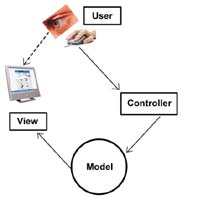 This can perhaps be best illustrated and described by a diagram of the GUI design scheme known as “Model- View-Controller (MVC).” GUI users believe that they are interacting directly with the “View” displayed for them on the screen. However, this software-constructed View is merely one of what might be many visual representations of the software “objects” that have been encoded in the single software “Model” that drives program. A separate “Controller” software unit acts upon any user inputs that have been defined in the Model as meriting a response – e.g., clicking and dragging a corner of the rectangle – and ignores all others. Whenever such an interaction via the Controller software results in a change in the state of the Model – e.g., a change in the stored size of a particular “rectangle” software object – the Model might generate an update in the View – e.g., an alteration of the size of the onscreen visual representation of the rectangle.
Thus, while GUI users experience themselves to be directly manipulating objects on the screen, users occupy no such direct causal relationship to the screen. Rather, the unseen software Model determines any onscreen representations and onscreen actions. The illusion of direct manipulation creates a believable user experience of hand-eye coordination, but, in fact, the unseen Model is always already operant “between” the user’s hand movements of the input device and the onscreen actions subsequently observed by the user’s eye. Well-engrained Aristotelian theatrical sensibilities that have trained GUI users to keep their focus confined to the screen have also disposed them to the belief that they are protectively “screened off” from the sort of dreaded backstage technical operations that users associate with non-GUI computing, but, in reality, these technologies operate neither “backstage” nor “behind the screen” but, rather, between the user and the screen.
Users know that the onscreen objects are not real. However, they are strongly inclined to believe that the illusory directness of their manipulations of the screen is real. Thus, the theatricality of the GUI user’s experience of onscreen performance produces not merely a “suspension of disbelief” but outright belief in an illusion – a belief that endures, even outside of the GUI performance context.
Constraints
Laurel insists that the GUI’s Aristotelian theatricality should be designed with sufficient “constraints” to discourage the user from even thinking about whether there are unseen software systems at work “backstage.” However, because users are often displeased by “explicit constraints” that prevent them from performing a certain action in a given context, GUIs should be designed instead with implicit constraints on what users are even “likely to think of doing,” because such constraints can be “applied without shrinking our perceived range of freedom.” (8)

Laurel’s rationale for such user constraint proceeds from her Aristotelian notions of theatrical character and action, where characters in a play have neither a free range of action nor a free range of thought about their choices of action but, rather, perform the actions that they have been designed to choose to perform within the given circumstances, in service of the play’s overall action scripted by the playwright. However, this particular theatrical analogy also casts light on the fact that users always perform within a scripted and constrained range of actions, and they perform as themselves only within the confines of a scripted and constrained character. But this “user model” is presented to us in such a way that our Aristotelian theatrical reflexes predispose us toward uncritical identification with this persona and the limited set of choices of action for the given circumstances.
Indeed, I suggest that the introduction of the Macintosh via Apple’s famous television commercial in 1984 inaugurated not only a new era of GUI-driven personal computing but also played upon a familiar “screenic theatricality” that predisposed consumers not only toward an acceptance of the commercial GUI’s theatrical experience as “intuitive” but also toward an identification with a new “class” of computer user: namely, the “end user,” the non-programmer. Such end users have continued to be depicted as being spared from what had been for previous generations of “users” the arduous task of writing their own software; however, the more subtle and deeply problematic reality is that end users were also locked out of access to software models that, in turn, shape the mental models of their own attributes, actions, and onscreen persona – not only in computer games but also in the “real life” work we do on computers.
Such highly constrained end user experiences are not always theatrically pleasurable. Consider, for example, an end user who observes two visually identical rectangles on the screen of an “application” software program such as Microsoft Word or PowerPoint.
The user knows from prior experience with the conventions of the commercial GUI’s theatricality that an onscreen image can be resized simply by clicking and dragging one of the “handles” displayed on its perimeter. However, on this occasion, when the user performs exactly the same resizing operation on two visually identical rectangles, there are two drastically different visual results:
n Kay had worked to develop Kay’s vision of the “Dynabook,” “a portable interactive personal computer, that would be accessible as a book.” (9) The Dynabook’s Smalltalk software included a graphical user interface designed to be so intuitive that even a child would be able to begin to learn to use this computer system, by means of intuitive graphical representations of objects, rather than having to master a cryptic syntax of alphanumeric commands.
A version of Smalltalk featuring a “desktop” GUI had also been deployed in the “Alto,” a computer designed at PARC for office employees with little or no computer experience. This was done in an attempt to demonstrate the feasibility and marketability of such technologies to Xerox executives – who were not convinced and soon canceled the Alto and Dynabook projects.
In 1979, Apple co-founder Steve Jobs visited PARC where he saw a demo of the version of the Smalltalk software used in the canceled Alto project, and he recalls that “within … ten minutes it was obvious to me that all computers would work like this some day.” (10) Inspired by what he had seen at PARC, Jobs was determined to develop an Apple microcomputer system featuring precisely this kind of graphical user interface, and, in 1984, the “Macintosh” was famously introduced, followed a year later by Microsoft’s “Windows.” The GUIs of both of these systems bore many similarities to PARC’s Smalltalk interface.
It is tempting to regard Kay’s vision of Smalltalk and the Dynabook as having been realized in the GUI-driven notebook computers and PDAs that have become ubiquitous in the present decade. However, Kay continues to insist that the Dynabook “revolution hasn’t happened yet,” criticizing the commercial GUI paradigm that has emerged, declaring that “both Apple and Microsoft did a terrible job adapting the PARC interface.” (11)
Given Brenda Laurel’s compelling arguments in 1991 in Computers as Theater regarding the inherent theatricality of the same commercial GUI paradigm that Kay condemns, I was quite surprised to hear Kay insist during a 2001 keynote address that the design of PARC’s Smalltalk had been informed primarily by a theatrical conception of the user experience, a fact Kay attributed largely to his heavy involvement in theater while he was an undergraduate when he “was supposed to be studying math.” (12)
Unfortunately, Kay’s remarks regarding this fundamental theatricality of Smalltalk turn out to be surprisingly few and aphoristic. However, I have come to believe to be the most crucial aspect of both Kay’s undergraduate theatrical experiences and the theatricality he envisioned for the Smalltalk user is that both are experiences of substantive theatrical participation.
It is crucial to remember that, unlike the Macintosh and Windows operating systems, Smalltalk was not merely an operating system featuring a graphical user interface, but was also a programming environment: in fact, the Smalltalk GUI, the Smalltalk operating system, and the Smalltalk application software programs were all written in the Smalltalk programming language. Moreover, one of the primary goals in developing Smalltalk for the Dynabook was to provide a more graphical and intuitive form of software programming.
Learning Curves
Kay had insisted that working with computer images provided one of the best examples of the kind of “learning curve” that he hoped Smalltalk could facilitate. A child working in Smalltalk will soon “learn that a picture has several representations, of which only the most obvious – the image – appears on the screen.” As the child begins to explore these other representations of the object, the child comes to realize that “the most important representation” is the “model,” which not only can be investigated through the various views but also is “editable.” (13)
During Smalltalk’s development, Kay’s team regularly introduced Smalltalk to children who had never used computers. After exploring the given Smalltalk objects and applications, these children would often soon decide that they would like to customize one of the given objects – e.g., to use the existing “brush” tool in the Smalltalk “paint” application to create a new, customized brush tool object that offered different characteristics. In time, a Smalltalk user would then go on to examine the object’s actual Smalltalk programming language code, which was much simpler syntactically than that of previous programming languages. Moreover, because of Smalltalk’s object-orientation, there was a clear correspondence to the graphical representations of the object, whereby elements of the Smalltalk code in the software model of this object could seem surprisingly familiar to the user, even at first glance.
 Thus, Smalltalk had been designed to facilitate the user’s journey along a learning curve that could lead to increasing degrees and additional forms of participation in the theatrical performance being staged – not unlike Kay’s experience of becoming increasingly involved in theater while an undergraduate. The Smalltalk user was not to remain a mere spectator, nor merely an onscreen performer with no awareness of what had been scripted, designed, or was operating “backstage.” Rather, Smalltalk was designed to help and to encourage the user to participate as designer and author of the theatrical experience as well, learning and acquiring new capacities for participation in doing so.
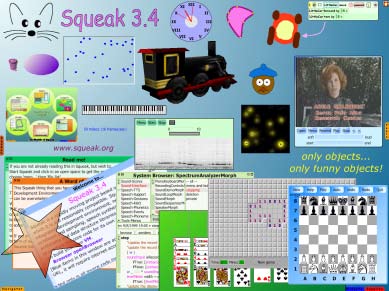
The Smalltalk programming language’s robust and powerful object-orientation aroused much interest and enthusiasm among expert software programmers, to such a degree that, as Xerox corporate support for Kay’s team’s Dynabook project waned, Smalltalk was gradually developed by others into a more powerful but also considerably more complex, programming language, one designed primarily for experienced programmers rather than for novices. However, in the late 1990s, Kay and other members of his PARC team were able to acquire the rights needed to resume development of one of the last of the noviceoriented versions of Smalltalk they had developed at PARC, resulting in the creation of “Squeak,” which Kay has called “a 21st-century version of the [Smalltalk] system we did at Xerox PARC,” where the goal once again was that or providing the user an intuitive, graphical, and object-oriented software authoring environment. (14)
Even so, I believe that an important aspect of the Smalltalk legacy has been largely overlooked: namely, that much higher-end image editing and illustration software, particularly those that work with vector image objects, can also be said to have preserved precisely the kind of “learning curve” experience that Kay had envisioned and had observed in action when novice users began to interact with image objects in Smalltalk.
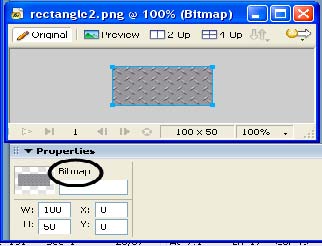 For example, in contrast to the alienating and disturbing end user experience of the “two rectangles” staged by typical commercial application software, software such as Adobe (formerly Macromedia) Fireworks stages a very different experience for the user. Like Smalltalk, Fireworks offers multiple representations of image objects. This creates the sort of theatrical experience that Bertolt Brecht called “complex seeing,” which challenges user expectations of over-simplified concepts and illusionistic aesthetics and provides instead the opportunity for what Brecht calls a more “scientific” form of theatrical engagement, leading not to mindless pleasure but to the pleasure of learning.
In addition to the two nearly identical graphical views of these two rectangles, the Fireworks user would see two very different representations of each rectangle in the Properties panel. There, one image is identified as a “bitmap” image:
Because the software model of a bitmap image is defined merely as a matrix of pixels, a kind of “spreadsheet” of color numbers that comprises a “recipe” for this image, the key attributes are limited largely to its pixel dimensions, as evidenced in the Properties panel.
In contrast, the other image is identified as a “rectangle” object:
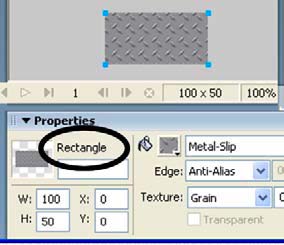 Here, the software model is the geometric one of a vector image object – in this case, a rectangle that not only has a certain width and height, but also is defined to have an edge of a particular thickness and color, filled with a particular color or pattern, and so on. Not only does this greater number of attributes offer more opportunities for manipulation, but a vector model also enables the performance of a variety of geometric operations, such as unions and intersections with other vector image objects:
 Thus, the Fireworks user is given not only a graphical view but also, in the Properties panel, a clear representation of the model of this object – what in object-oriented programming (OOP) terms would be called the general class of this image object and the current states of the key attributes for this particular instance of this class. The attributes shown in the Properties panel correspond so isomorphically to the software model of this vector object that they facilitate user understanding of the categorical difference in class between these two visually identical rectangles, explaining why they behaved so differently when they were resized.And while some might insist that this is still a far cry from what would usually be considered to object-oriented programming, I content that such richly object-oriented graphical computing undertaken in software like Fireworks is an indeed graphical – but, nonetheless, true – form of object-oriented programming and is an important remnant of the PARC Dynabook Smalltalk vision. Alan Kay, in fact, has often insisted that Ivan Sutherland’s 1963 “Sketchpad” system deserves to be considered to be the first object-oriented programming environment because this entirely graphical system of object design had made use of “master” objects that functioned much like “classes” do in OOP
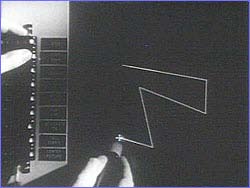 This is, of course, also the way “symbols” and vector objects function in Fireworks as well as in Flash.
Thus, it is no accident that such graphical notions of object-oriented programming seem to have been preserved in such digital media software; these were the primary modes in which such visionaries as Sutherland and Kay conceived and implemented these ideas and technologies in the first place. Therefore, I suggest that such object-oriented software experiences offer a uniquely valuable learning curve opportunity for end users to break out of the constraints upon their range of knowledge and action by the commercial GUI paradigm that has dominated computing for the last quarter-century. Indeed, this pedagogically multi-modal graphical, alphanumeric, and kinesthetic learning curve is one that often leads to surprising forms of object-oriented programming. I continue to be astonished by the growing number of digital media artists in recent years whose creative drive has led them to undertake the learning of software programming. The sheer syntactical difficulty of such “standard” programming languages such as Java and C++ still pose a lamentably steep learning curve. However, it is becoming increasingly common for artistic users to move from creating animations in Adobe (formerly Macromedia) “Flash” strictly via the GUI to “coding” animating instructions in “ActionScript,” Flash’s JavaScript-like programming language. (15) In such “scripting” languages, “friendlier” than most full-fledged programming languages, resizing a given onscreen rectangle object to a size of 400 x 200 pixels might be done via code as simple as:
rect.width = 400;
rect.height = 200;
Likewise, the work of Casey Reas and Ben Fry this decade in developing the Java-based “Processing” programming language for graphical artists also points toward remarkable possibilities inherent in a return to a more graphical, artistic, and theatrical conception of object-oriented programming language design, pedagogy. (16)
Footnotes:
- Brenda Laurel, Computers as Theatre. (Addison-Wesley Professional, 1993), 41.
- Ibid., 32.
- Ibid., 15.
- Ibid., 15-16.
- Ibid., 14-16.
- Ibid., 15-16.
- Ben Shneiderman, “Direct manipulation: a step beyond programming languages,” IEEE Computer August (1983) 57–69.
- Ibid., 105.
- Alan Kay and Adele Goldberg. “Personal Dynamic Media.” Computer, 10 (1977): 31-41.
- “Triumph of the Nerds: The Transcripts, Part III.” http://www. pbs.org/nerds/part3.html (Accessed March 11, 2009).
- Alan Kay. “The Computer Revolution Hasn’t Happened Yet.” Keynote address at the Digital Cultures Project, UCSB, Santa Barbara, California, March 8, 2002.
- Ibid.
- Alan Kay. “Microelectronics and the Personal Computer.” Scientific American, September, 1977, 236.
- Kay, “The Computer Revolution Hasn’t Happened Yet.”
- Flash’s ActionScript has recently become fully object-oriented as of version 3.0.
- “Processing is an open source programming language and environment for people who want to program images, animation, and interactions. It is used by students, artists, designers, researchers, and hobbyists for learning, prototyping, and production. It is created to teach fundamentals of computer programming within a visual context and to serve as a software sketchbook and professional production tool.” Processing 1.0. http://www.processing.org (Accessed March 11, 2009)
Works Cited:
Kay, Alan. “The Computer Revolution Hasn’t Happened Yet.” Keynote address at the Digital Cultures Project, UCSB, Santa Barbara, California., March 8, 2002.
Kay, Alan. “Microelectronics and the Personal Computer.” Scientific American, September, 1977, 236.
Kay, Alan and Goldberg, Adele. “Personal Dynamic Media.” Computer, 10 (1977): 31-41.
Laurel, Brenda. Computers as Theatre. Addison-Wesley Professional, 1993.
Shneiderman, Ben. “Direct manipulation: a step beyond programming languages,” IEEE Computer August (1983) 57–69.
“Triumph of the Nerds: The Transcripts, Part III.” http:// www.pbs.org/nerds/part3.html (Accessed March 11, 2009).
Processing 1.0. http://www.processing.org (Accessed March 11, 2009)