
V5N1: Teaching Programming to Students of Digital Media and Arts
By Jennifer Burg | July 2, 2013
Why Should Art Students Learn How to Program?
Not all professors of art or music would agree that they should spend time teaching programming to their digital art students. First of all, programming may not have been part of their own educations. Secondly, time is limited. Theory, history, and traditional genres already fill up the schedule. So how can we justify adding this technical and, to some, rather unappealing subject to the digital art or music curriculum? The simple answer is that we’re talking about a program in digital media and arts, and in this realm, programming is one of the most basic tools with which artists can express themselves. Mateas argues that all new media artists need procedural literacy1 – the ability to solve problems in a logical, step-by-step fashion, which is, essentially, programming. Computer programming is a tool or instrument which–like a brush, pencil, violin, or piano–has its own characteristic expressions and timbre. But it’s more than that. Computer programming also provides conceptual context, a realm of experience that can become the subject of art. We will try to illustrate both these points in what follows. The point is that before introducing the nuts and bolts of computer programming to art and music students, we need to motivate them by showing them just why they should invest time in something that otherwise may not seem interesting or natural to their “mindstyles.”
Let’s consider first the characteristic expressions made possible by computer programming, restricting the discussion to visual art for the moment. One fundamental element that distinguishes digital media from other visual art media is that it can be dynamic. Programming is what lends digital art its dynamism and motion. A program executes over time. As time passes, things change. Being able to program gives the artist control over how the changes evolve.
It could be argued, however, that digital artists can create dynamic pieces without really knowing how to program. There exist programming environments in which you can select items from a menu or palette, drop them onto a “stage,” click on them and select a “behavior,” and watch them do their thing. Many environments enable tweening–morphing an object from one shape, color, or position to another–by a simple menu selection. The authoring programs Director and Flash are such environments. This process of pointing and clicking and dragging and dropping is, underneath, computer programming, but the artist is sheltered from the details. Does the artist really need to understand what’s going on at the code level? What can the artist do with programming skills that he or she wouldn’t be able to do otherwise? Why should an artist learn Director’s scripting language, Lingo? Or Flash’s scripting language, ActionScript? Or Maya’s scripting language, MEL? Why should an artist take the time to learn the fundamentals of computer programming?
Without an understanding of variables, flow of execution, iteration, conditions, functions, and assignment statements, the artist can use only the high level building blocks provided by the language environment–e.g., predefined behaviors that can be modified only by certain parameters. Producing dynamic artwork from these parts is like piecing together a house from modular, prebuilt components. Without the ability to program, there’s a limit to the artist’s originality and the extent to which he or she can control the creative process.
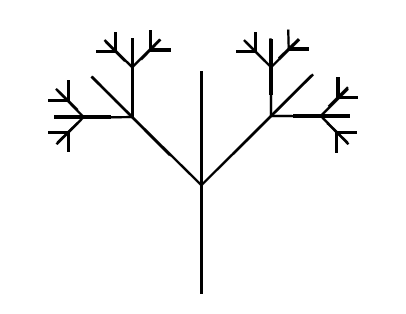
Figure 1 Tree fractal
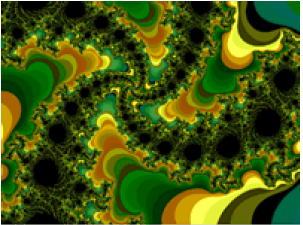
Figure 2 Julia fractal
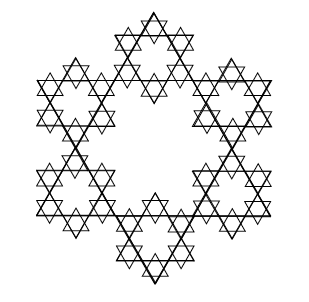
Figure 3 Koch star
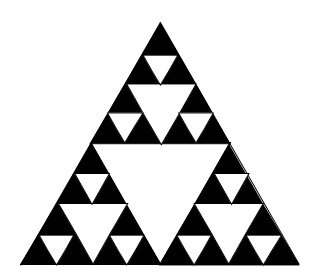
Figure 4 Sierpinski’s gasket
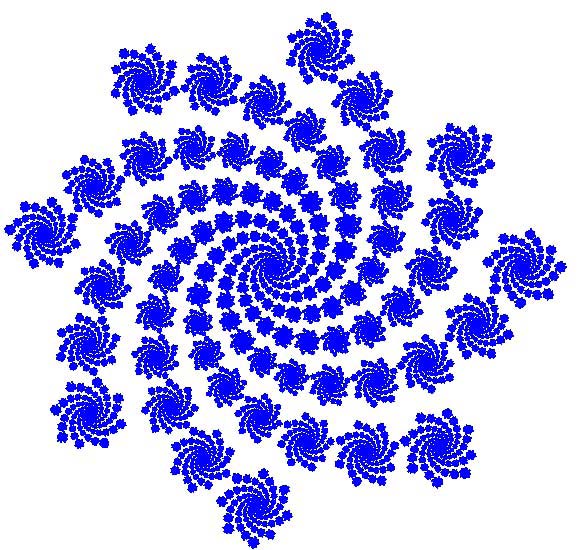
Figure 5 Recursive spiral
The ability to program gives artists a new language to speak, one based on loops, recursion, conditions, data, mathematical computations, and changing states. These basic elements of computer programming gives rise to what we have called programming’s characteristic expression. A recursive program–where a process makes reference to itself until a base state is reached–can be reflected in a visible structure–one that is defined by itself until some primitive point. Fractals are a well-known example of recursive structures.2 They can be as simple as the fractal tree structure in Figure 1 or as complex as the Julia fractal in Figure 2, but in either case, they are naturally generated by a recursive program. Koch stars (Figure 3) and Sierpinksi’s gaskets (Figure 4) are other examples of simple recursive structures. Loops, recursion, and geometric computations give rise to spirals such as those in Figure 5.3
These images give just a preview of graphical structures that can naturally arise from computation. Artists can find a multitude of ways to give life and motion to such structures. Through the power of computer programming, their productions can be carefully crafted and controlled.
Then again, programming can give artists interesting ways in which to relinquish control. A program can be written to be non-deterministic, which means that its outcome is not certain because a random element has been introduced. Programs can also surprise the creator with emergent behavior. This is a situation where, again, the programmer isn’t sure what the program is going to produce–not because of a random element, but because the relationship between the computation and the visual elements to which it gives rise is too hard to analyze. Mandelbrot fractals are a result of emergent behavior. How could one predict that repeatedly computing a simple assignment statement like czz+=2 and assigning colors to pixels based on the result would produce the beautiful self-similar structures that Mandelbrot discovered? (The Julia fractal in Figure 2 is a variant of the Mandelbrot fractal.) Clifford Pickover has been toying with these mathematical and algorithmic wonders for years. His books–e.g., The Pattern Book, Chaos and Fractals, and a series of more recent ones–give inroads to the mathematical beauty that can be manifested through computer programs.4
Interactivity is another of the unique features available to digital artist programmers. Viewers and listeners of the art work–who we will call players–become collaborators in interactive digital art. The collaboration can be with the art work itself, where the player becomes co-creator. In the work of Peter Cho, the stroke of a mouse across an image triggers mathematical computation along the mouse’s path–cutting, smearing, and reweaving the image. With a mouse click on a different image, the selected area springs forward, leaving an onion-skinned trail as it ricochets from one edge to another.5
Alternatively, the collaboration can be between the player and the computer. An amusing example is “Agent Ruby’s Edream Portal,” a web-based reincarnation of the “Turing test.” The original test proposed by Alan Turing had one human–a questioner–speaking to another human and a computer through an interface that hid the identity of the two being questioned. If the questioner could not detect from the answers which was the human and which was the computer, the computer was deemed sufficiently human-like to pass the Turing intelligence test. Through a web interface by Lynn Hershman, Agent Ruby invites you to type in questions and comments, her face blinking, smiling, and grimacing at you as she gives quite convincingly-human responses in real time.6 Ira Greenberg’s extensive work with the Processing programming language7 illustrates the possibilities of creative interaction with the computer. His “Reo-Geo” offers controls for creating geometric forms of different colors, while “Dynamic Aesthetic Matrix” allows the user to pull on spinning balls in a dynamic spring-like web.8
Interactive visual art moves toward narrative in projects such as “World of Awe,” an interactive story that allows the player to travel through a virtual space to explore “the connections between storytelling, travel, memory, and technology.”9 In the realm of sound, MAX/MSP10 provides a platform for composing interactive music, as illustrated in Winkler’s book and interactive concert.11 In all these examples, the player interacts with the “system” which is, underneath, a computer program.
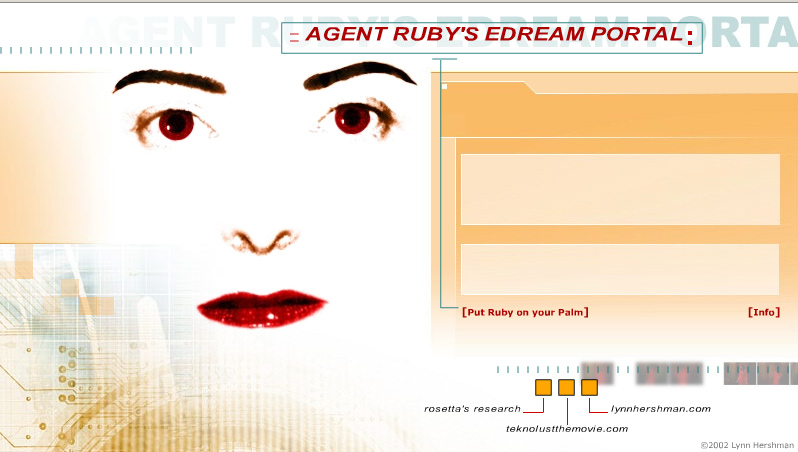
Figure 6 Agent Ruby’s Edream Portal by Lynn Hershman
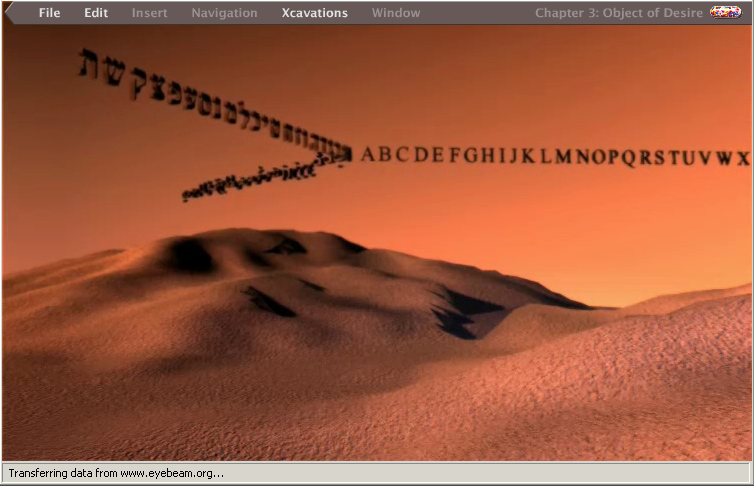
Figure 7 World of Awe by Yael Kanarek
As a third alternative, the collaboration can be between the player and other human players who together create images, sounds, music, or stories. The Princeton Laptop Orchestra illustrates this on a large scale, constituting a network of laptop computers equipped with programming languages such as MAX/MSP and ChucK and conducted by wireless connections.12 The orchestra is put to use in “The Telephone Game: Oil/Water/Ether,” which presents its players with “a custom flexible step-sequencer” to make music and sounds. The fun twist is that players can spy on each other through the network, appropriating and spinning each other’s ideas. The intended result is that “unplanned structures begin to emerge, like oil on water, as riffs propagate and evolve, sometimes returning unrecognizable to their creators.”13
Thousands of digital media productions such as these can be found all over the web. We give just a few examples to illustrate the point that these are the characteristic expressions of digital art: dynamism; control in tension with non-determinism and emergent behavior; interactivity; and collaborative engagement of the player in interaction with the artwork, the system, or other human players.
In addition to its characteristic expressions, computer programming situates the artist in a new conceptual realm where the language, its structures, and the flow of data become not just the medium of expression, but also its subject. We have yet to get over the novelty of our “second life,” the new and pervasive digital environment of email, the web, cell phones, wireless communication, and virtual reality. Artists reflect this preoccupation in their work, making digital media not just the media but the message. Benjamin Fry conceives a web server as “an elegant computational organism,” a globe-spanning system whose activity is visualized as growing and atrophying based upon its widespread interactions. Computer typography is “a writhing … creature that grows as it traverses the web hungry for new information to assimilate into its form.”14 In a piece called “Power Structures,” participants are invited to contribute information about the people and events that tie them together, and maps are produced from this to act as “narrative structures outlining the flow of influence” and “the network of power brokers” that influence our daily lives.15 “Inventor’s Network” displays inventors as nodes in a web of interactions where colors and sizes represent age and importance of collaborations.16 “Themail” and “The Mountain” visualize email archives over the years.17
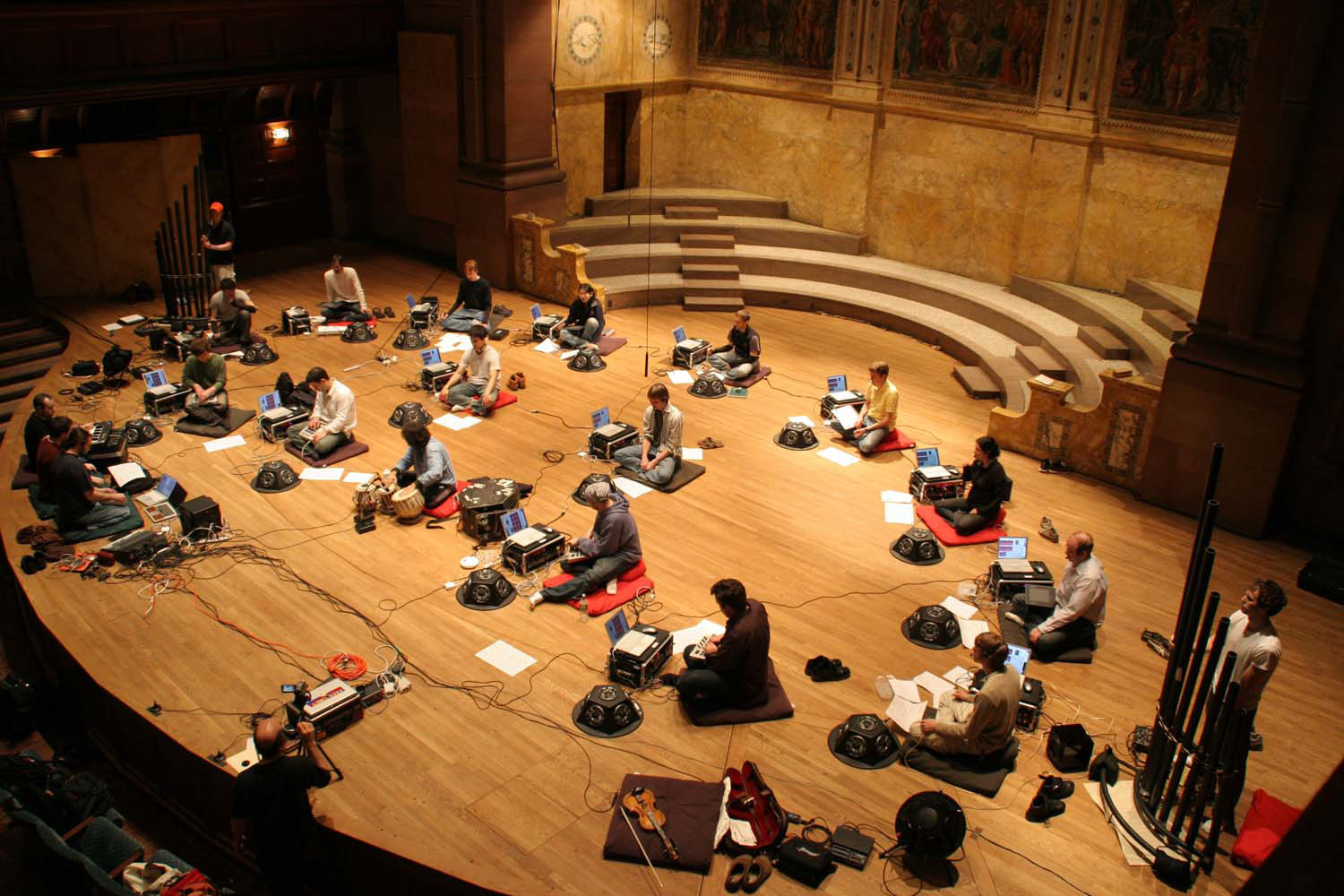
Figure 8 Princeton Laptop Orchestra
Martin Wattenberg, whose work ranges from artistic visualizations of stock market data18 to dynamic representations of the thinking process of an intelligent chess program,19 observes:
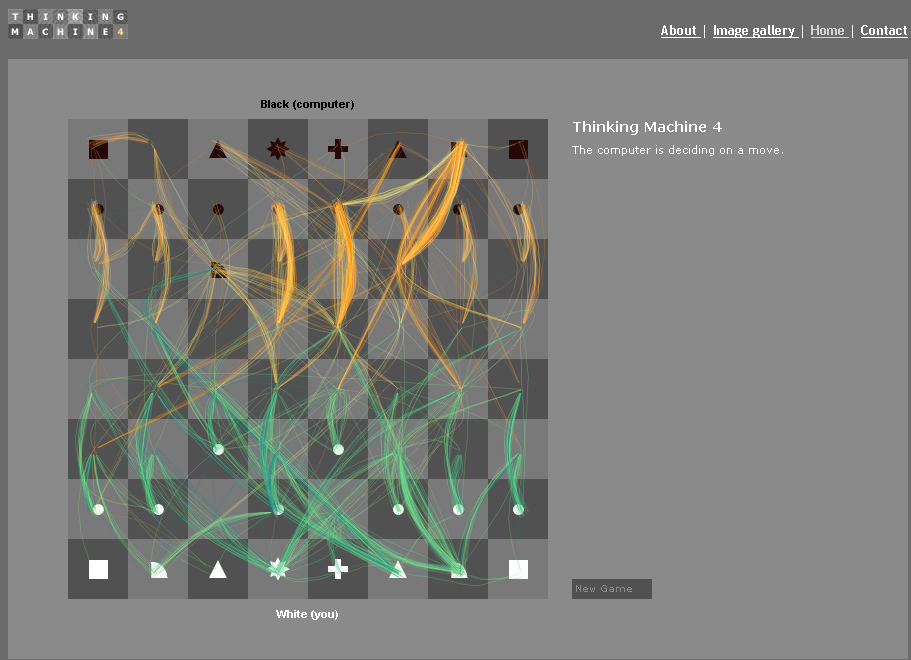
Figure 9 Thinking Machine by Martin Wattenberg
We can take enormous data sets and present them in a spectacular array of ways. They can be space-filling, three dimensional, hyperbolic, zoomed in or out of, or drilled into. But they can also fail in a variety of ways: by being cluttered, obscure, labyrinthine, or dizzying…. As a designer, I take comfort in the thought that while hidden pitfalls await, so do hidden treasures.20
We need to convince students that in order to unlock these hidden treasures, they first need to spend some time with what might seem rather mundane and uninspiring nuts and bolts of computing programming.
How Can Computer Programming Be Taught to Students of Digital Media and Arts?
So how do we get students of music and art to the point where they can take advantage of this new tool, computer programming? The trouble is that there can be a big disconnect between creative experimentation in digital art and the not-so-exciting programming concepts that put an artist on the path to this type of creativity.
Consider list of basic programming concepts that are necessary starting points:
- Algorithms (logical, step-by-step methods for solving problems)
- top-down design (looking at a higher level abstraction first and moving progressively to lower levels of abstraction)
- object-oriented programming (a programming style where entities in a program are thought of as objects that have properties and actions they can do)
- variables (places to store, change, and access values)
- assignment statements (ways to change the values of variables)
- functions (reusable, encapsulated methods for doing something in a program, often returning a value)
- parameters (values sent into a function)
- loops (actions in a program that are repeated a set number of time, with changing values)
- conditions (ways to control what happens in a program based on “if” something is true)
- flow of control (the sequence of steps that a program goes through based on the conditions, loops, etc. that it encounters)
- recursion (a function that calls upon itself until some base case is reached)
- mathematical expression (expressions like x = y −2)
- Boolean logic (a complete system for logical operations based on knowing whether basic elements are true or false and then looking at their truth value when they are combined with “and,” “ors,” “nots,” etc.)
- events (things that happen in a program that trigger other things – like a mouse movement or a keystroke)
- basic syntax (the required order of variables, numbers, punctuation, keywords, etc. in a program)
Yawn, says the artist. Unless these concepts are motivated by examples and programming assignments that are visual, aural, dynamic, and interesting to the artist, there isn’t much hope for inspiration.
Computer science professors have realized the need for more relevant curriculum even among their own non-art students. The move in computer science education in the last five years has been toward interdisciplinarity and multimedia programming environments. Recent first semester programming textbooks use languages that lend them selves to early production of multimedia elements and are illustrated with assignments that manipulate colors, sound, and dynamic objects, often through graphical user interfaces.21
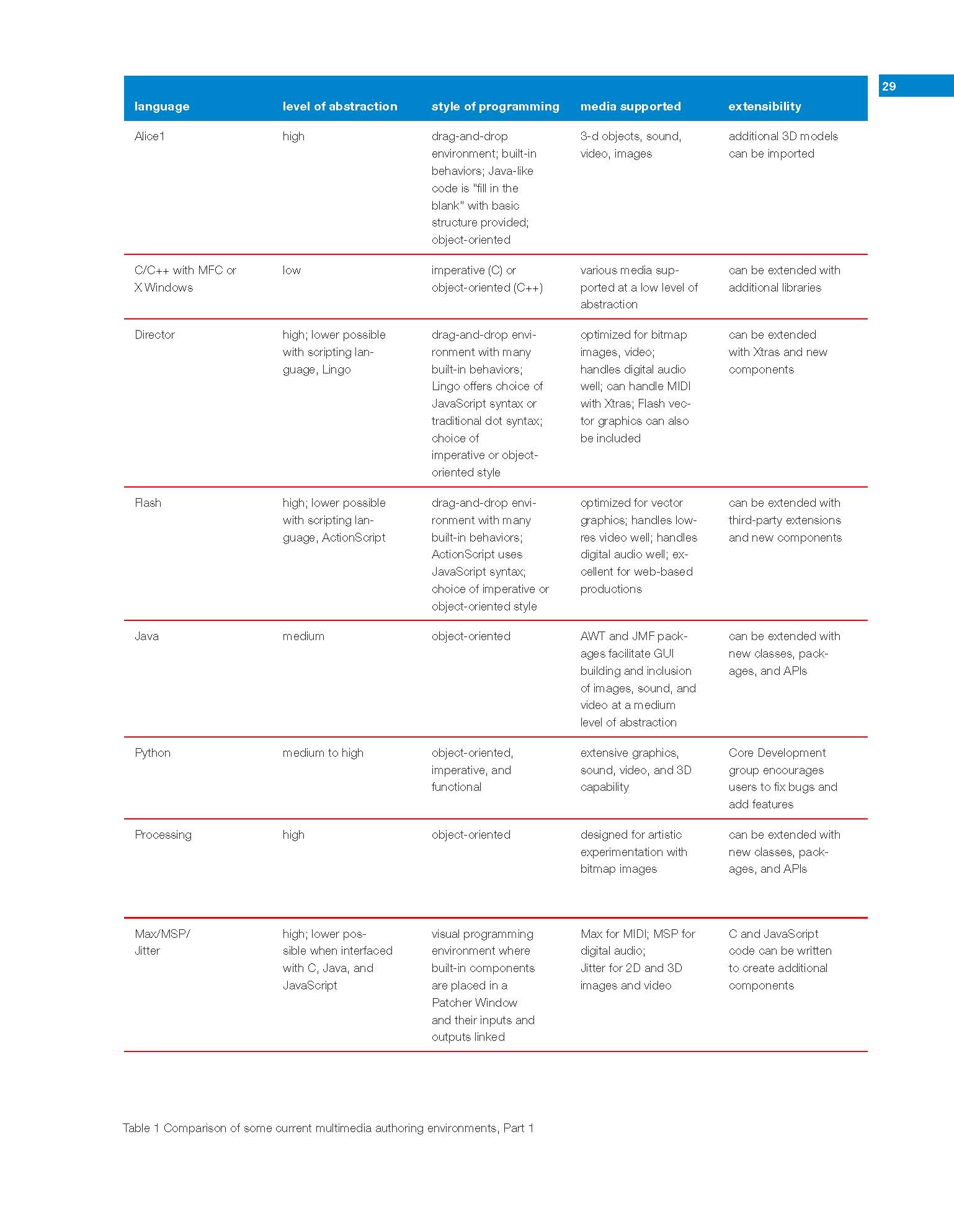
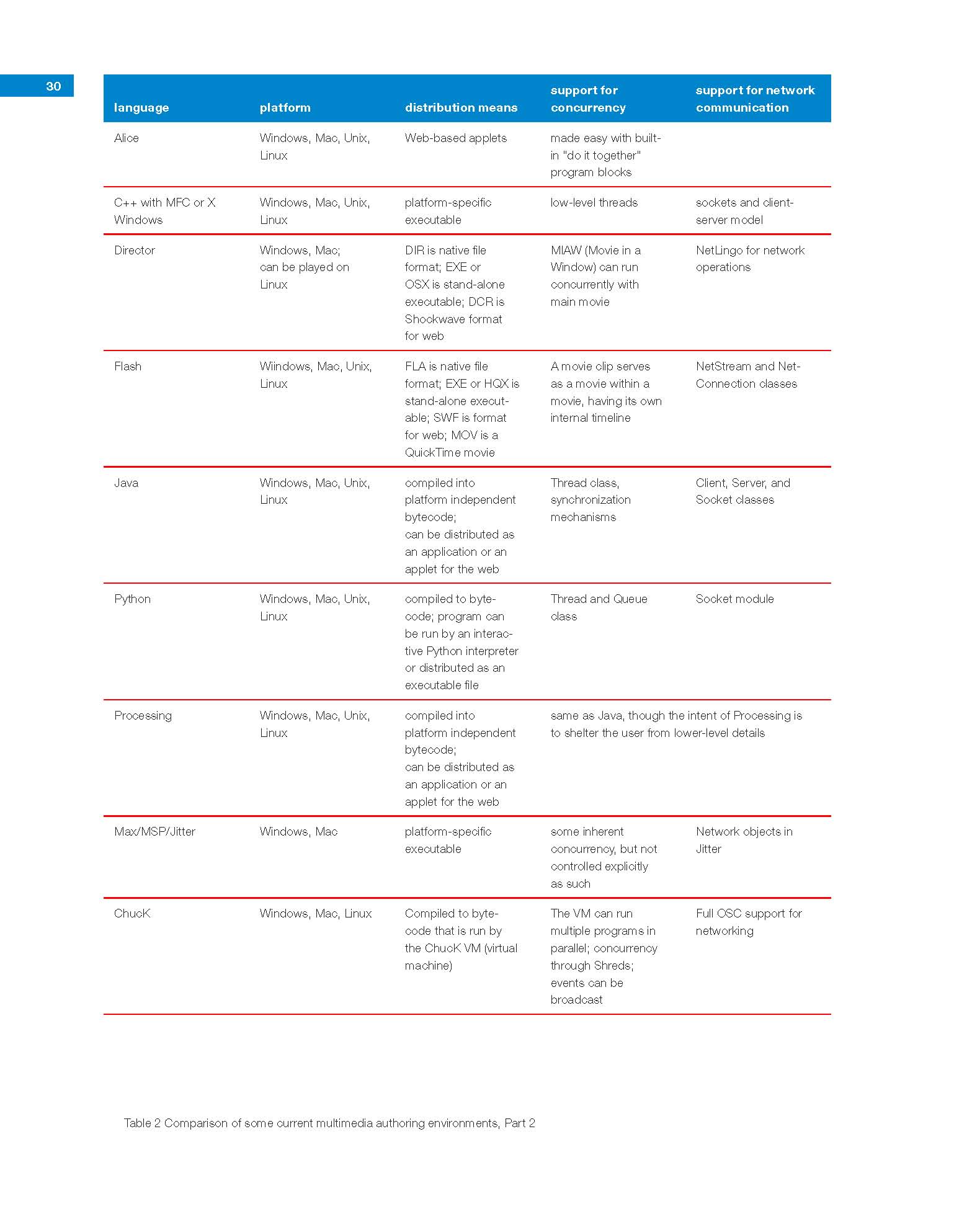
To capture the interest of art and music students, it’s essential to begin by showing examples of the works that can be created through computer programming–works like those outlined in the section above. As learning proceeds, programming concepts need to be linked to visible, audible, playable products, even though they may be simple in the beginning. (What those “good” programming assignments might be could the subject of a whole other paper–but looking at some of the recent programming textbooks gives you an idea. The language websites for Processing, Python, Alice, Flash, and Director also have abundant examples.)
Choosing the right introductory language for digital artists is equally important. Many good choices are available, varying in level of abstraction, suitability for different media, and so forth. Here are some of the important criteria to consider in the choice of a programming language for digital media and arts students. More details on these considerations can be found in The Science of Digital Media.22
- Level of abstraction and ease of programming. Drag-and-drop, point-and-click, with built-in behaviors, or lower level with more code-writing? Is there an integrated development environment (IDE)?
- Media supported. Does the language support vector graphics? Bitmap images? Sound? MIDI? Video? Interactivity? 3D?
- Programming paradigm. Is there a scripting language? Does it support object-oriented programming? Is it an event-based language?
- Extensibility. Can you add features to the language or environment with additional third-party plug-ins or extras?
- Execution efficiency of the language. (Some languages can handle complication mathematical computation better than others in that they execute faster.)
- Cost. Is the language or environment freeware? Shareware? A commercial product?
- Language stability Is it standardized? Still rapidly changing versions?
- Memory requirements.
- Platform. What operating system does the language run under?
- Distribution means. What options do you have for distributing your multimedia production, in terms of both operating system and distribution media like web, CD, DVD, etc.?
Tables 1 and 2 give an overview of the features of some of the currently most attractive programming language environments for students of digital media and arts.
In the opinion of the author, the languages break down as follows:
Alice is a good teaching language/multimedia environment in that it quickly allows students to create fun 3-D projects while illustrating basic programming constructs. Projects can be made into web applets, which is additionally motivating because students can share their work. However, students sometimes get distracted with the visual 3-D element at the expense of concepts. Also, Alice creates programs of a certain consistent 3-D look, so the usefulness of this language alone for creative exploration is limited.
The syntax of C/C++ is too abstruse and fussy as an introductory language for digital media and arts students.
Director is excellent for bitmap graphics, sound, and video, and it also has a 3-D component. Flash objects can also be integrated. Programming can be done at a high level of abstraction with a timeline, tweening, and built-in behaviors, or students can descend to the scripting language, Lingo, which can be programmed in procedural or object-oriented style. However, Director is expensive, and one sometimes wonders about its longevity because of the dominant interest in its cousin, Flash.
Flash is excellent for vector graphics, sound, and video and web-animations with small file sizes. Like Director, Flash allows you to program at a high level of abstraction with a timeline, tweening, and built-in behaviors, although the programming metaphor is different. With Director, the metaphor is “actors, called sprites, on a stage that is arranged frame-by-frame via a timeline.” With Flash, the metaphor is “graphical objects drawn on sheets of acetate, one laid on top of the other, these objects tweened separately.” Flash’s use of “timelines within timelines” by means of movieclips facilitates concurrent animation. Flash’s scripting language, ActionScript, is a full-featured language that can be written in procedural or object-oriented style. Flash/ActionScript is catching on in computer science departments as an introductory programming language because students can create interesting multimedia programs while learning the language fundamentals.
Java is a good language if you want to be in that intermediate ground between a high and low-level of abstraction. It is an object-oriented language that has a large number of classes packaged with it. This is both a good and a bad point. It’s good in that there are classes for GUIs, bitmap graphics and vector graphics, sound, video, network communication, and concurrency. It’s bad because there’s a big learning curve for students as they familiarize themselves with all these packages of classes at the same time that they are trying to grasp the object-oriented paradigm and learn the basic programming constructs. An advantage of Java is that programs can be compiled to executable form in the traditional way, or as an alternative, they can be written as applets to be executed from web pages.
Python23 is also catching on in computer science departments. It is a palatable language for digital media and arts students because of its English-like syntax and features for multimedia programming. Python runs on all major platforms and is free, open-source software. It’s a good possibility as a first language for art students.
Processing24 was designed particularly for art students as a language with which they can manipulate bitmaps in creative ways while learning fundamental programming concepts. Built on top of Java, Processing shelters the programmer from some of the messy details in Java–e.g., ActionListeners that have to be applied to objects to “listen” for events like mouse clicks and keystrokes. Processing is primarily a learning environment–a good introductory one for visual art students, but one from which they would want to advance to other more flexible platforms.
MAX/MSP/Jitter is a visual programming environment for MIDI, audio, and video (respectively). It allows the programmer to work with high level MIDI, audio, or video objects that are linked with patch cords–a metaphor that simulates real-world hardware connections in a way that makes sense to beginning audio programmers. All the basic programming constructs can also be applied–conditions, loops, mathematical expressions, and the like–and the programmer can also descend to Javascript or C++ modules. This is an excellent environment where students of digital sound and music can experiment in ways that help them understand the nature of MIDI and digital sound; how filters, EQ, pitch shifts, compression, and the like operate at the algorithmic or mathematical level; and how sound can be manipulated creatively at a lower level of abstraction. The visual user interface makes it easy to write the first “programs.” However, the difficulty level quickly increases as concepts of programmer are intertwined with concepts of digital sound and MIDI.
ChucK (created by Ge Wang, Perry Cook, et al.)25 is an interesting audio/MIDI manipulation program at a lower level of abstraction. Those who have used it with students report that the students learn ChucK quickly and can go far with it. It has potential for creative exploration in the area of digital sound.
Last Thoughts
Having said all this–trying to find a way to interest students of digital media and arts in learning how to program–we have to add that the dichotomy between “art” and “science” students is often drawn too sharply. In the author’s experience in interdisciplinary courses, many art students take to programming, logic, and mathematics quite handily; and many computer science students also play musical instruments, sing and act, and have an artistic sensibility. This paper focuses on reaching those students for whom programming has little interest or attraction, bringing them into the fold, and leading them to the point where they have a new very powerful creative tool in their grasp. In order to teach programming effectively to students of digital media and arts, instructors first need to educate themselves in the types of works that can be created with multimedia programming and the languages that can take students to that point. It’s an innovative field, both intellectually and artistically stimulating, and learning about it is worth the effort.
Footnotes
- Michael Mateas, “Procedural Literacy: Educating the New Media Practitioner,” On the Horizon 13, 2 (2005): 101-111.
- John Briggs, Fractals: The Patterns of Chaos (New York: Simon & Schuster/A Touchstone Book, 1992).
- Istvan Hargittai and Clifford A. Pickover. Spiral Symmetry (Singapore: World Scientific, 1992).
- Clifford Pickover, The Pattern Book: Fractals, Art, and Nature (Singapore: World Scientific, 1995) and Clifford Pickover, Chaos and Fractals: A Computer Graphical Journey (Elsevier, 1998).
- John Maeda, Creative Code (New York: Thames & Hudson, 2004), 79, and Peter Cho, “Portfolio: Numerical Photography, http://acg.media.mit.edu/people/pcho/portfolio/mas961.html (accessed June 2, 2008).
- Lynn Hershman, “Agent Ruby’s EDream Portal,” (2001), http://agentruby.sfmoma.org/indexflash.html (accessed May 21, 2008).
- Ira Greenberg, Processing: Creative Coding and Computational Art (Berkeley, CA: Friends of Ed, 2007) and “Ira Greenberg,” http://www.iragreenberg.com/ira_greenberg_data/index.html (accessed June 2, 2008).
- Ira Greenberg “Reo-Geo,” http://www.iragreenberg.com/ira_greenberg_data/code/reo_geo/reo_geo.html (June 2, 2008) and Ira Greenberg, “Dynamic Aesthetics Matrix,” http://www.iragreenberg.com/ira_greenberg_data/code/dam/index.html (accessed June 2, 2008).
- Yael Kanarek, “World of Awe,” (2001), http://www.worldofawe.projects.sfmoma.org/. (May 21, 2008).
- “MAX/MSP/Jitter,” http://www.cycling74.com (accessed May 25, 2008).
- Todd Winkler, “Interactive Concert,” http://www.brown.edu/Departments/Music/sites/ winkler//music/int_concert/index.html (accessed May 21, 2008), and Todd Winkler, Composing Interactive Music: Techniques and Ideas Using Max (Boston: MIT Press, 2002).
- “The Princeton Laptop Orchestra,” http://plork.cs.princeton.edu/ (accessed May 21, 2008).
- The Princeton Laptop Orchestra, “The Telephone Game: Oil/Water/Ether,” (2007), http://transition.turbulence.org/Works/plork/ (accessed May 21, 2008).
- Benjamin Fry, quoted in John Maeda, Creative Code, (New York: Thames & Hudson, 2004), 59, 102.
- Aaron Siegel, “Power Structures,” (2008), http://rhizome.org/profile.php?user_id=1027584. (May 21, 2008).
- Lee Fleming and Matt Marx, “Evolution of Inventors Network,” (2006), http://www.visualcomplexity.com/vc/project_details.cfm?id=546&index=546&domain (accessed May 23, 2008).
- Fernanda Viégas, “The Mountain,” http://alumni.media.mit.edu/~fviegas/research.html. (accessed May 21, 2008), and Fernanda Viégas and Scott Golder, “Themail,” http://alumni.media.mit.edu/~fviegas/research.html (accessed May 21, 2008).
- Martin Wattenberg, “Map of the Market,” (1998), http://www.smartmoney.com/map-of-the-market/ (accessed May 23, 2008).
- Martin Wattenberg, “Thinking Machine,” (2003), http://www.bewitched.com/chess.html (accessed May 23, 2008).
- Martin Wattenberg, quoted in John Maeda, Creative Code (New York: Thames & Hudson, 2004), 78.
- Wanda Dann, Stephen Cooper, and Randy Pausch, Learning to Program With Alice, 2nd edition (Prentice-Hall, 2008) and Mark Guzdial, Introduction to Computing and Programming In Python: A Multimedia Approach (Upper Saddle River: Prentice-Hall, 2005).
- Jennifer Burg, The Science of Digital Media (Upper Saddle River, New York: Pearson/Prentice-Hall, 2008).
- “Python,” http://www.python.org/ (accessed May 25, 2008).
- “Processing,” http://processing.org/ (accessed May 25, 2008) and Casey Reas, Ben Fry, and John Maeda, Processing: A Handbook for Visual Artists and Designers (Boston: MIT Press, 2007).
- “ChucK,” http://chuck.cs.princeton.edu/ (accessed May 25, 2008).
Bibliography
Alice. http://chuck.cs.princeton.edu/ (accessed May 25, 2008).
Briggs, John. Fractals: The Patterns of Chaos. New York: Simon & Schuster/A Touchstone Book, 1992.
Burg, Jennifer. The Science of Digital Media. Upper Saddle River, New York: Pearson/Prentice-Hall, 2008.
ChucK by Wang Ge. http://chuck.cs.princeton.edu/ (accessed May 25, 2008).
Dann, Wanda P., Stephen Cooper, and Randy Pausch. Learning to Program With Alice. 2nd ed. Prentice-Hall, 2008.
Fleming, Lee and Matt Marx. “Evolution of Inventors Network.” 2006. http://www.visualcomplexity.com/vc/project_details.cfm?id=546&index=546&domain (accessed May 23, 2008).
Greenberg, Ira. “Dynamic Aesthetics Matrix,” http://www.iragreenberg.com/ira_greenberg_data/code/dam/index.html (accessed June 2, 2008).
Greenberg, Ira. Processing: Creative Coding and Computational Art.Berkeley, CA: Friends of Ed, 2007.
Ira Greenberg “Reo-Geo,” http://www.iragreenberg.com/ira_greenberg_data/code/reo_geo/reo_geo.html (accessed June 2, 2008).
Guzdial, Mark. Introduction to Computing and Programming In Python: A Multimedia Approach. Upper Saddle River: Prentice-Hall, 2005.
Hargittai, Istvan, and Clifford A. Pickover. Spiral Symmetry. Singapore: World Scientific, 1992.
Hershman, Lynn. Agent Ruby’s EDream Portal. 2001. http://agentruby.sfmoma.org/indexflash.html (accessed May 21, 2008).
“Ira Greenberg,” http://www.iragreenberg.com/ira_greenberg_data/index.html (accessed June 2, 2008).
Kanarek, Yael. World of Awe. http://www.worldofawe.projects.sfmoma.org/. 2001 (accessed May 21, 2008).
Maeda, John. Creative Code. New York: Thames & Hudson, 2004.
Mateas, Michael. “Procedural Literacy: Educating the New Media Practitioner.” On the Horizon 13, 2 (2005): 101-111.
MAX/MSP/Jitter. http://www.cycling74.com/ (accessed May 25, 2008).
Pickover, Clifford. The Pattern Book: Fractals, Art, and Nature. Singapore: World Scientific, 1995.
Pickover, Clifford. Chaos and Fractals: A Computer Graphical Journey. Elsevier, 1998.
The Princeton Laptop Orchestra. http://plork.cs.princeton.edu/ (accessed May 21, 2008).
The Princeton Laptop Orchestra. “The Telephone Game: Oil/Water/Ether.” 2007. http://transition.turbulence.org/Works/plork/ (accessed May 21, 2008).
Processing. http://processing.org/ (accessed May 25, 2008).
Python. http://www.python.org/ (accessed May 25, 2008).
Reas, Casey, Ben Fry, and John Maeda. Processing: A Handbook for Visual Artists and Designers. Boston: MIT Press, 2007.
Siegel, Aaron. “Power Structures.” 2008. http://rhizome.org/profile.php?user_id=1027584 (accessed May 21, 2008).
Viégas, Fernanda. “The Mountain.” http://alumni.media.mit.edu/~fviegas/research.html (accessed May 21, 2008).
Viégas, Fernanda and Scott Golder. “Themail,” http://alumni.media.mit.edu/~fviegas/research.html (accessed May 21, 2008). “
Wattenberg, Martin. “Map of the Market.” 1998. http://www.smartmoney.com/map-of-the-market/ (accessed May 21, 2008).
Wattenberg, Martin. “Thinking Machine.” 2003. http://www.bewitched.com/chess.html (accessed May 23, 2008).
Winkler, Todd. Composing Interactive Music: Techniques and Ideas Using Max. Boston: MIT Press, 2002.
Winkler, Todd. Interactive Concert. http://www.brown.edu/Departments/Music/sites/ winkler//music/int_concert/index.html (accessed May 21, 2008).